The AI QA Report

Find what's broken in your game before your players do

Every studio has shipped an update that broke something nobody touched. Most of them found out from their own players, in the reviews, after the rating had already dropped. This is the cheap way to find out first.

The QA engine running a live test pass. It plays the game the way a player does, not the way a checklist does.

What you get back

One written report, in your hands inside 48 hours of paying. Not a dashboard login, not a raw log dump, not a spreadsheet you have to interpret.

In the report
1
Every break we find, on desktop and mobile
Both, always. Most Roblox bugs that cost real players are mobile-only, and mobile is where most of your players actually are.
Included
2
Ranked by what it's costing you in players
Not by severity label, and not in the order we happened to find them. The thing making people quit in the first minute goes at the top. Cosmetic issues go at the bottom, honestly marked as cosmetic.
Included
3
A screenshot of each finding
So a developer on your team can go straight to it. No reproducing from a text description, no back and forth asking us what we meant.
Included
4
What we checked and did not find
A clean pass on a system is information too. You get the coverage, not just the failures.
Included
If it finds nothing worth fixing, you learned that for $249. That is a real outcome, and we will tell you plainly rather than padding the report.

It plays your game from the inside

The engine opens your place in Roblox Studio and actually plays it: it drives test bots through your systems, re-verifies every pass independently instead of trusting its own first answer, and sweeps simulated phones and tablets as well as desktop. Because it runs from the inside, it catches the error behind the symptom, not just the symptom.

The run dashboard as a pass executes.

It is the same engine we run against our own published games before every release. You are buying an afternoon of its output, not a licence to it.

What we need, and what we never touch

The engine doesn't click around a public server from the outside. It runs inside Roblox Studio against your actual place, which is exactly why it can read the error behind the symptom, drive test bots through your systems, and sweep simulated phones and tablets. That means we need a copy of the game it can open. Two ways, your pick:

Either one works
  • The place file. In Studio: File, then Save to File. Send us the .rbxl. Takes two minutes, and you never grant anyone access to anything.
  • Or Team Create. Add us for the 48 hours, remove us when the report lands. Same pass, slightly easier for your team to walk findings back against the build.
What we never do
  • Publish, deploy or save changes to your game. Test runs happen in play mode, which resets itself.
  • Ask for account credentials, ever
  • Need admin or group ownership rights
  • Share your findings with anyone, or use your game in our marketing without written permission
Running a licensed property and can't grant a stranger access? The place file path exists exactly for you. A .rbxl export is a copy: we test the copy, you keep the keys, and nothing we do can touch the live game.

The performance audit: $250 on its own, $49 with your QA pass

The QA pass finds what's broken. The performance audit finds what's slow: the same engine measures your game against the budgets that keep phones at 60fps, because roughly 90% of Roblox players are on a phone or tablet, and a game that stutters there bleeds players just as surely as a bug does.

Why it's $49 instead of $250: the expensive part of an audit is getting set up inside your build, and if you've bought the QA pass we're already in there. You're paying for the extra measurement run, not for the setup a second time.
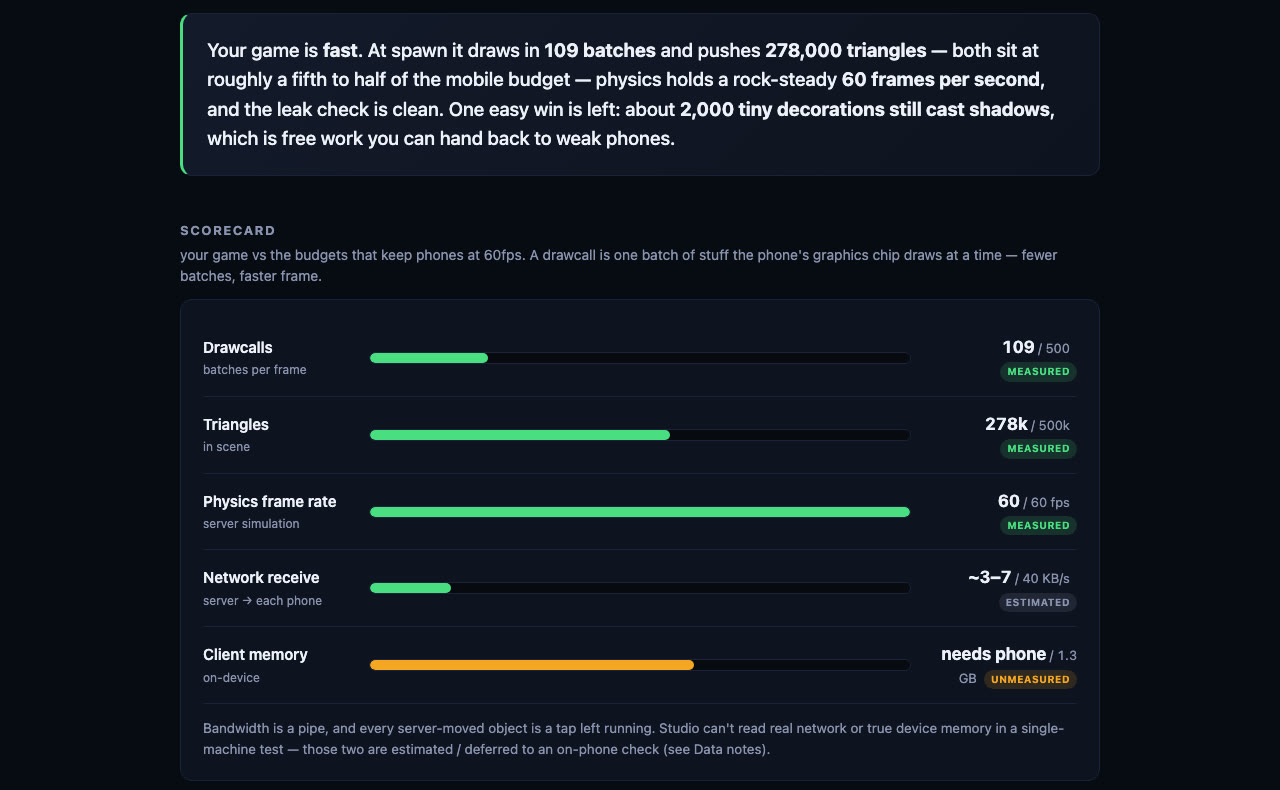
A PlayUGC performance report: measured drawcalls, triangles, physics frame rate, network and memory graded against mobile 60fps budgets, with the wins worth protecting listed below.
A real performance report from one of our own games. Measured numbers against phone budgets, what's already fast, and what's costing you, in order.

You get the graded scorecard (drawcalls, triangles, physics rate, network, memory), what's already fast and worth protecting, the hotspots ranked by cost, and the three fixes worth your week. Measured in a live play session, never guessed from a checklist.

Only want the speed pass and not the QA report? Buy the performance audit on its own, $250.

Fixed prices, paid upfront

No call to book, no scoping thread, no proposal. You pay, you send the place, the clock starts.

$249
The AI QA Report. One game, one full pass.
  • Written report back within 48 hours
  • Desktop and mobile, both included
  • Findings ranked by player impact
  • A screenshot on every finding
  • No retainer, no subscription
Get the QA Report
Best value
$499 You save $201
$298
QA Report + Performance Audit. The audit is $250 on its own, $49 here.
  • The full QA report, same 48 hours
  • The measured performance scorecard
  • Graded against 60fps phone budgets
  • Hotspots ranked by what they cost
  • The three fixes worth your week
Get both, $298
You'll tell us your game link at checkout, then send the place file or a Team Create invite on the next page. The 48 hours run from the moment we can open the game.

Running something bigger than a QA pass, like getting an existing property onto Roblox in the first place? That's the other half of what we do.